
Mazda CX-5 Service & Repair Manual: Engine Coolant Protection Inspection
1. Measure the engine coolant temperature and specific gravity using a thermometer and a hydrometer.
CAUTION:
-
Use engine coolant at a concentration that meets the environmental conditions in which the vehicle is driven, otherwise engine damage could occur.
-
The engine has aluminum parts and must be protected by an ethylene-glycol-based coolant to prevent corrosion and freezing.
-
Do not use coolants containing Alcohol, Methanol, Borate or Silicate. These coolants could damage the cooling system.
-
Use only soft (demineralized) water in the coolant mixture. Water that contains minerals will cut down on the coolant’s effectiveness.
-
Engine coolant damages paint. If engine coolant does get on a painted surface, rinse it off quickly.
NOTE:
-
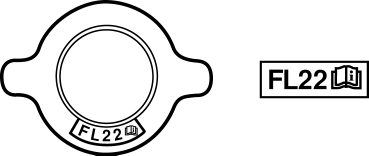
If the “FL22” mark is shown on or near the cooling system cap, use Mazda Genuine FL22 engine coolant.
-
FL22 type engine coolant is shipped as a diluted solution. Use the solution as is when replacing coolant.
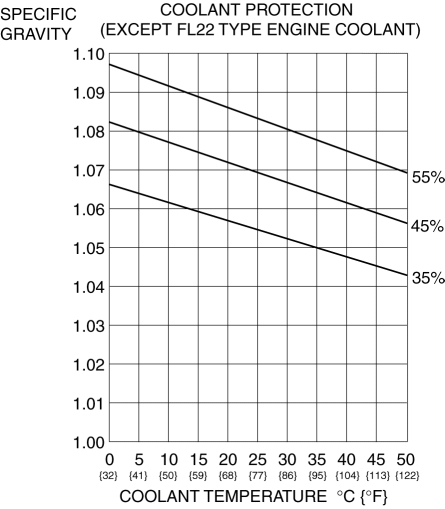
2. Determine the engine coolant protection level by referring to the graph shown in the figure.
-
If the engine coolant protection level is not correct, add water or engine coolant.
 Engine Coolant Level Inspection
WARNING:
Never remove the cooling system cap or loosen the radiator drain plug while
the engine is running, or when the engine and radiator are hot. Scalding engine
coolant and steam may ...
 Engine Coolant Replacement
WARNING:
Never remove the cooling system cap or loosen the radiator drain plug while
the engine is running, or when the engine and radiator are hot. Scalding engine
coolant and steam may ...
Other materials:
Bsm Indicator Light Flashes While Not Under Bsm Indicator Light Flashing Conditions
(No Combination Switch Operation (Turn Signal Switch)) [Blind Spot Monitoring (Bsm)]
Description
BSM indicator light flashes while not under BSM indicator light-flashing
conditions (no combination switch operation (turn signal switch)
The BSM indicator light flashes despite not satisfying the BSM indicator
light flashing ...
Rear Bumper Disassembly/Assembly
1. Disassemble in the order indicated in the table.
1
Screw
2
Reflector
3
Rear bumper face
2. Assemble in the reverse order of disassembly. ...
Judder Upon Torque Converter Clutch (TCC) Operation [Fw6 A EL, Fw6 Ax EL]
TROUBLESHOOTING ITEM
Judder upon torque converter clutch (TCC) operation
DESCRIPTION
Vehicle jolts when TCC is engaged.
POSSIBLE CAUSE
Signal malfunction
APP ...
