
Mazda CX-5 Service & Repair Manual: Electric Power Steering (Eps) Motor
Purpose, Function
-
The EPS motor is driven by the control current from the EPS CM (control module) and generates assist torque to manual steering mechanism.
Construction
-
The EPS motor is installed to the steering column with an integrated EPS CM.
-
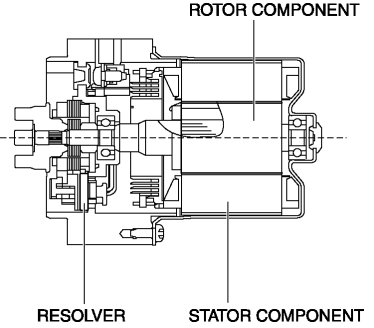
The EPS motor is a brushless motor which consists of a three-phase star-connected stator, a permanent magnet rotor, and resolver sensor.
Operation
-
Current flows from the EPS CM to the stator to rotate the motor axis which is integrated with the rotor.
-
A resolver sensor for detecting rotation angle is built into the EPS motor and outputs a motor rotation angle signal to the EPS CM.
-
The EPS CM switches the current flowing to each stator based on the rotation angle signal from the resolver sensor.
Fail-safe
|
DTC No. |
Fail-safe function |
|
C200D:1C |
|
|
C200D:64 |
|
|
U2011:19 |
|
|
U2011:1C |
|
|
U2011:62 |
|
|
U2011:72 |
|
|
U2011:92 |
|
 Electric Power Steering (Eps) Control Module
Purpose/ Function
The EPS control module (CM) calculates the optimum assist current based on
the steering torque signal from the torque sensor installed to the steering
column and the veh ...
 Electric Power Steering System
Outline
A column assist type EPS has been adopted for all models.
EPS provides smooth handling from low to high speeds as a result of the excellent
steering feel provided by the elec ...
Other materials:
Steering SST
49 T028 3A0
Ball joint puller set
49 T025 001
Boot clamp crimpers
49 B032 317
Bearing & oil seal remover
49 B018 003
Body B
49 E032 308
Wrench
...
Front Combination Light
Purpose
Parts related to the front exterior lights are grouped and housed together
such as the headlight, front turn/parking light, headlight leveling actuator,
wiring harnesses, and connectors.
Function
Each light illuminates or flashes when the light switch, turn switch, ...
Spark Plug [Skyactiv G 2.0]
Purpose, Function
The spark plug generates spark, ignition of the air-fuel mixture occurs,
and combustion of the air-fuel mixture is triggered.
Construction
The spark plug is installed to the cylinder head.
Iridium on the center electrode and platinum on the ...
