
Mazda CX-5 Service & Repair Manual: Disc Pad (Front) Replacement
1. Remove in the order indicated in the table.
2. Install in the reverse order of removal.
3. After installation, depress the brake pedal a few times, rotate the wheel by hand, and verify that the brake does not drag.
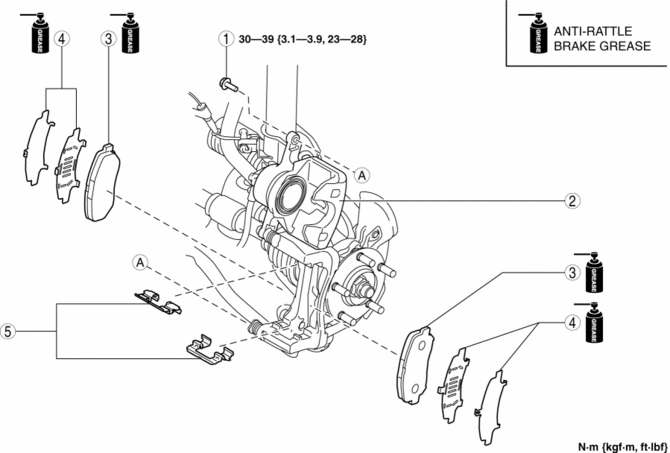
|
1 |
Bolt |
|
2 |
Caliper |
|
3 |
Disc pad (See Disc Pad Installation Note.) |
|
4 |
Shim |
|
5 |
Guide plate |
Disc Pad Installation Note
1. Clean the exposed area of the piston.
2. Push the piston in using the commercially available disc brake expand tool.
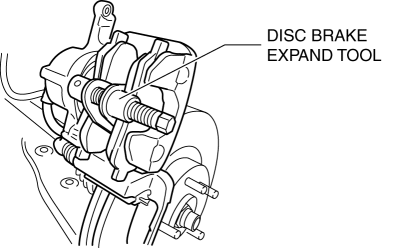
3. Install the disc pads to the mounting support.
 Conventional Brake System
Outline
A brake pedal with an intrusion minimizing mechanism has been adopted. As
a result, driver safety has been improved.
A small diameter long-stroke type master cylinder has bee ...
 Disc Pad (Rear) Replacement
1. Remove in the order indicated in the table.
2. Install in the reverse order of removal.
3. After installation, pump the brake pedal a few times and inspect the following:
The disc pad ...
Other materials:
Fuel Gauge Sender Unit Inspection [2 Wd]
NOTE:
For the fuel gauge sender unit removal/installation, refer to the fuel pump
removal/installation because the fuel gauge sender unit is integrated with the
fuel pump..
1. Verify that the resistance at fuel gauge sender unit terminals D and C is
as indicated in the table ac ...
Meter Hood Removal/Installation
1. Disconnect the negative battery cable..
2. Remove the upper column cover.
3. Using a phillips screwdriver, remove fasteners.
NOTE:
When pulling up the shaft of fasteners using a phillips screwdriver, the
shaft will not be pulled up if it is rotated by pressing the driver. To pull ...
Steering Gear And Linkage Removal/Installation
CAUTION:
Performing the following procedures without first removing the ABS wheel-speed
sensor may possibly cause an open circuit in the wiring harness if it is pulled
by mistake. Before performing the following procedures, disconnect the ABS wheel-speed
sensor (axle side) and fix t ...
