
Mazda CX-5 Service & Repair Manual: Dashboard Under Cover Removal/Installation
1. Detach hooks A in the direction of arrow (1) shown in the figure.
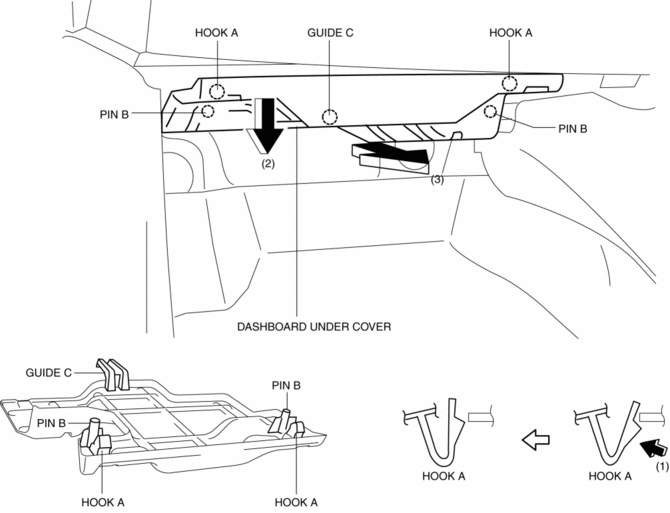
2. Pull the dashboard under cover in the direction of arrow (2) while detaching pins B.
3. Remove the dashboard under cover in the direction of the arrow (3) shown in the figure while detaching the guide C.
CAUTION:
-
If hooks A and pins B is removed forcefully, guide C may be damaged. Carefully remove hooks A and pins B so as not to damage guide C.
4. Install in the reverse order of removal.
 Dashboard Removal/Installation
1. Disconnect the negative battery cable..
2. Remove the following parts:
a. Windshield wiper arm and blade.
b. Cowl grille.
c. Windshield wiper motor.
d. Front scuff plate.
e. Front side ...
 Decoration Panel Removal/Installation
CAUTION:
Affix protective tape to the position shown in the figure.
1. Disconnect the negative battery cable..
2. Open the glove compartment.
3. Insert a tape-wrapped flathead ...
Other materials:
On Board Diagnostic System PID/Data Monitor Inspection [Fw6 A EL, Fw6 Ax EL]
1. Connect the M-MDS to the DLC-2.
2. After the vehicle is identified, select the following items from the initialization
screen of the M-MDS.
a. Select “DataLogger”.
b. Select “Modules”.
c. Select “TCM”.
3. Select the applicable PID from the PID table.
4. Verify the PID da ...
Liftgate Hinge Removal/Installation
1. Disconnect the negative battery cable..
2. Remove the following parts:
a. Rear scuff plate.
b. Trunk end trim.
c. Trunk side trim.
d. C-pillar trim.
e. D-pillar trim.
f. Liftgate.
3. Remove fasteners.
4. While partially peeling back the rear part of the headliner, remove nut ...
Fuel Shut Off Valve
U.S.A. And CANADA
Purpose, function
Prevents fuel from flowing to the charcoal canister during tight turns or
vehicle rollover.
Releases evaporative gas to the charcoal canister.
While refueling, the fuel shut-off valve closes to prevent a fuel overflow.
Construction ...
