
Mazda CX-5 Service & Repair Manual: Crankshaft Position (CKP) Sensor Removal/Installation
CAUTION:
-
When foreign material such as an iron chip is on the CKP sensor, it can cause abnormal output from the sensor because of flux turbulence and adversely affect the engine control. Be sure there is no foreign material on the CKP sensor when replacing.
-
Do not assemble the CKP sensor or change the installation position using any method other than the following. Otherwise, it could negatively affect engine controls, such as the ignition timing and fuel injection.
1. Disconnect the negative battery cable..
2. Lift up the vehicle.
3. Perform the following procedure for easier access.
a. Remove the service hole cover (installed to front under cover No.2) used to remove the oil filter..
b. Remove the front splash shield (RH)..
4. Disconnect the CKP sensor connector.
5. Remove the CKP sensor.
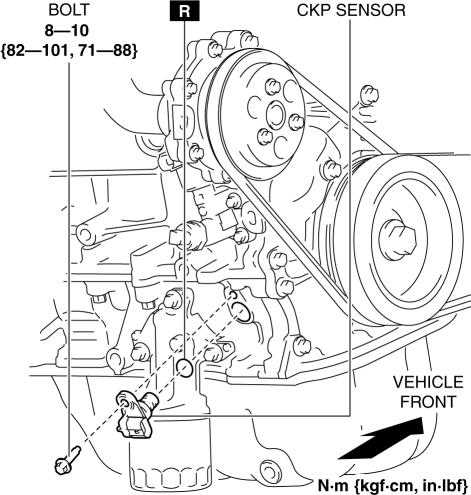
6. Install in the reverse order of removal.
 Crankshaft Position (CKP) Sensor Inspection
Visual Inspection
CAUTION:
When foreign material such as an iron chip is on the CKP sensor, it can cause
abnormal output from the sensor because of flux turbulence and adversely affect
...
 Crankshaft Position (CKP) Sensor
Purpose/Function
Detects the crankshaft speed as basic information for mainly determining
the fuel injection timing and ignition timing.
Detects the crankshaft speed and inputs it to ...
Other materials:
Front ABS Wheel Speed Sensor Removal/Installation
1. Remove the mudguard..
2. Remove in the order indicated in the table.
3. Install in the reverse order of removal.
4. After installation, verify that there is no twisting in the front ABS wheel-speed
sensor.
1
Connector
2
Bolt
...
Keyless Beeper
Purpose, Function
Notifies the user that the lock/unlock operation of the advanced keyless
entry system is completed, and warns if the system is operated incorrectly.
Construction, Operation
Installed inside the cowl grille.
The keyless beeper operates based on the LF ...
Rear Door Speaker Inspection
1. Disconnect the negative battery cable..
2. Remove the rear door trim..
3. Disconnect the rear door speaker connector..
4. Verify that the resistance between the rear door speaker terminals is as indicated
in the table.
If not as indicated in the table, replace the rear door sp ...
