
Mazda CX-5 Service & Repair Manual: Cooling System Cap Inspection
WARNING:
-
Never remove the cooling system cap or loosen the radiator drain plug while the engine is running, or when the engine and radiator are hot. Scalding engine coolant and steam may shoot out and cause serious injury. It may also damage the engine and cooling system.
-
Turn off the engine and wait until it is cool. Even then, be very careful when removing the cap. Wrap a thick cloth around it and slowly turn it counterclockwise to the first stop. Step back while the pressure escapes.
-
When you are sure all the pressure is gone, press down on the cap using the cloth, turn it, and remove it.
1. Clean the cooling system cap and the sealed part.
2. Inspect the cooling system cap for cracks or everted seal.
-
If there is any malfunction, replace the cooling system cap.
3. Attach the cooling system cap to the radiator cap tester.
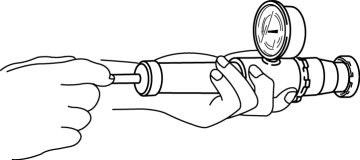
4. Hold the cooling system cap downward and apply pressure gradually. Verify that the pressure is held stable for 10 s.
-
If the pressure is not held stable, replace the cooling system cap.
-
Cooling system cap valve opening pressure
-
93.2—122.6 kPa {0.951—1.250 kgf/cm2, 13.6—17.7 psi}
 Cooling Fan Motor Removal/Installation
WARNING:
Never remove the cooling system cap or loosen the radiator drain plug while
the engine is running, or when the engine and radiator are hot. Scalding engine
coolant and steam may ...
 Cooling System Cap
Purpose, Function
The cooling system cap maintains appropriate pressure in the engine coolant
passage. In addition, cooling efficiency has been improved by increasing the
engine coolant b ...
Other materials:
Fuel Gauge Sender Unit Inspection [Awd]
Fuel gauge sender unit (main)
NOTE:
For the fuel gauge sender unit removal/installation, refer to the fuel pump
removal/installation because the fuel gauge sender unit is integrated with the
fuel pump..
1. Verify that the resistance at fuel gauge sender unit (main) terminals D a ...
Interior Lighting System
Outline
A room light control system has been adopted in which illumination time and
illumination level of the interior lights change.
The rear body control module (RBCM) performs room light control system fail-safe..
Structural View
System Wiring Diagram
...
Engine Oil Pressure Warning Light
Purpose
The engine oil pressure warning light warns the driver that the engine oil
level is insufficient.
Function
When the instrument cluster receives the engine oil pressure warning light
request signal sent from the PCM via the CAN signal, it illuminates the engine
oi ...
