
Mazda CX-5 Service & Repair Manual: Controller Area Network (Can) System
Outline
-
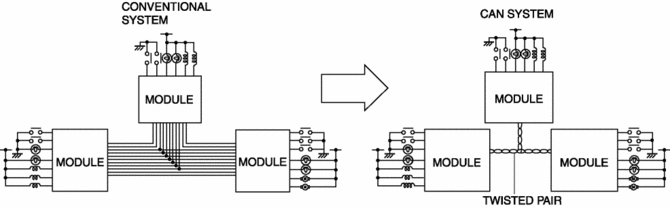
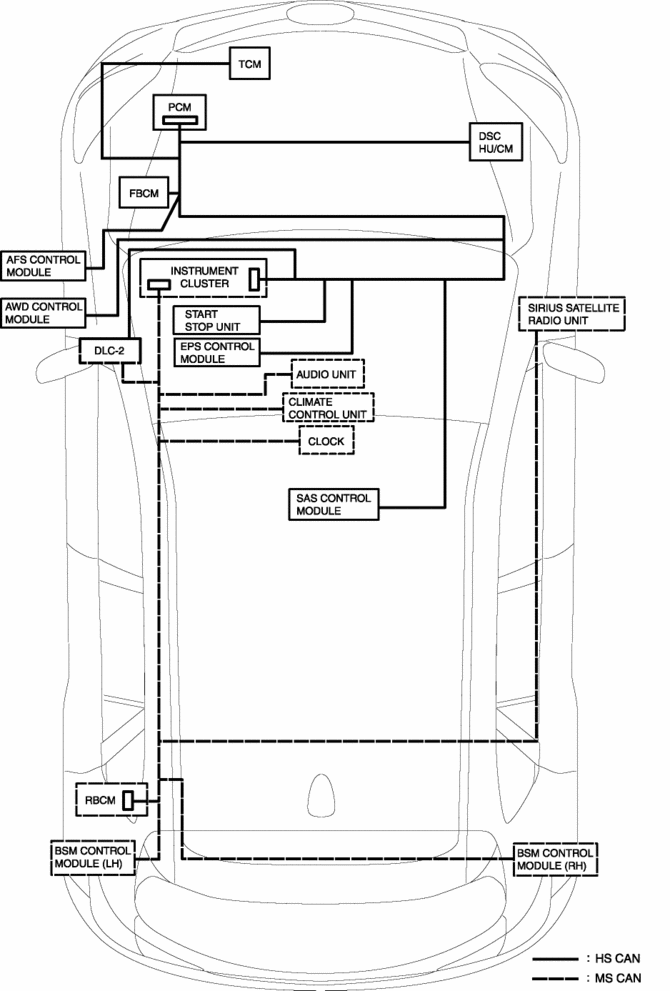
A CAN system has been adopted which can send and receive multiple signals over a single communication path from related modules.
System wiring diagram
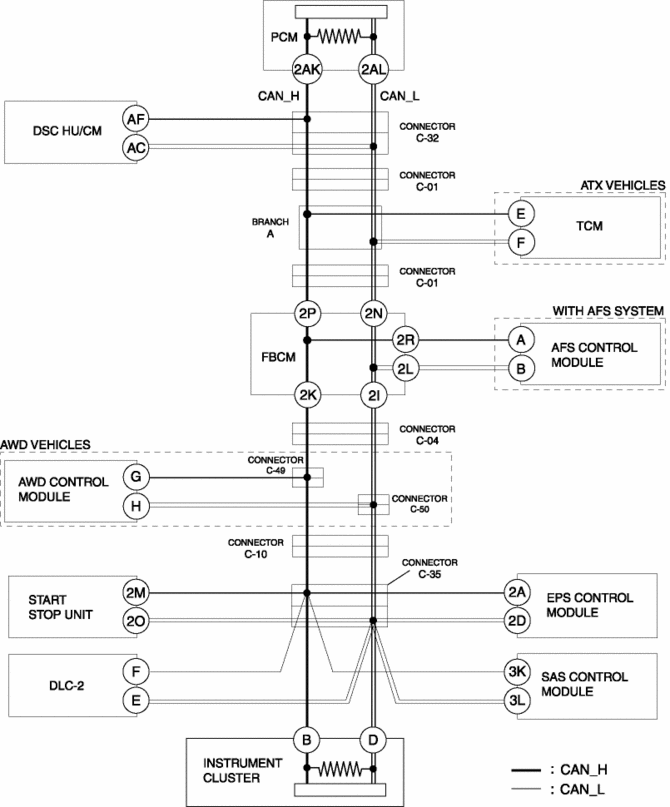
HS-CAN
MS-CAN
Structure
-
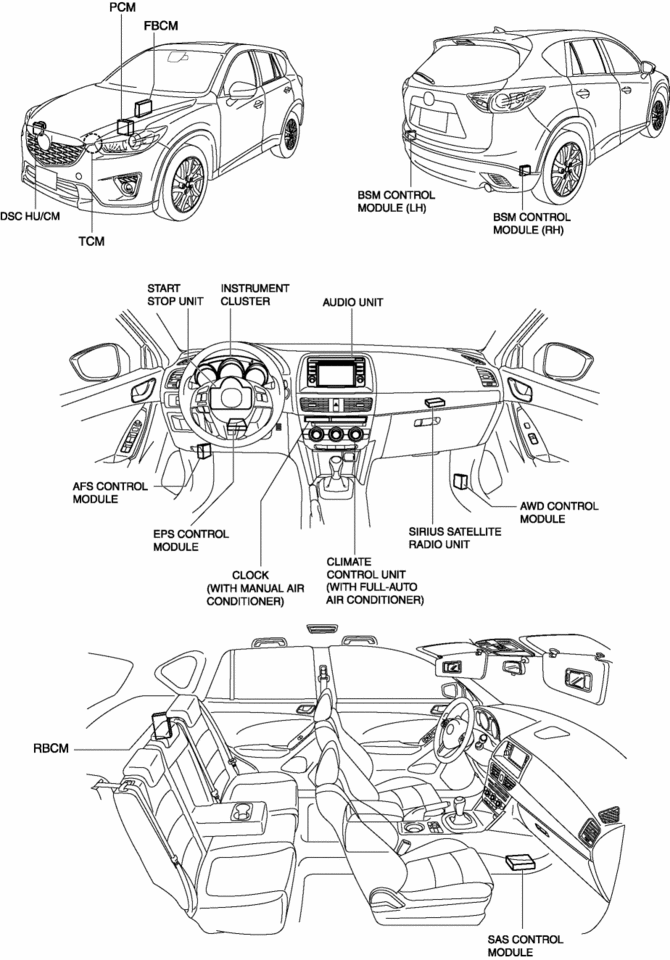
The CAN system consists of CAN system-related modules built into the CPU and wiring harnesses connecting related modules.
Function
-
Terminator resistors are built into the PCM and instrument cluster which form the HS-CAN between the PCM and instrument cluster.
-
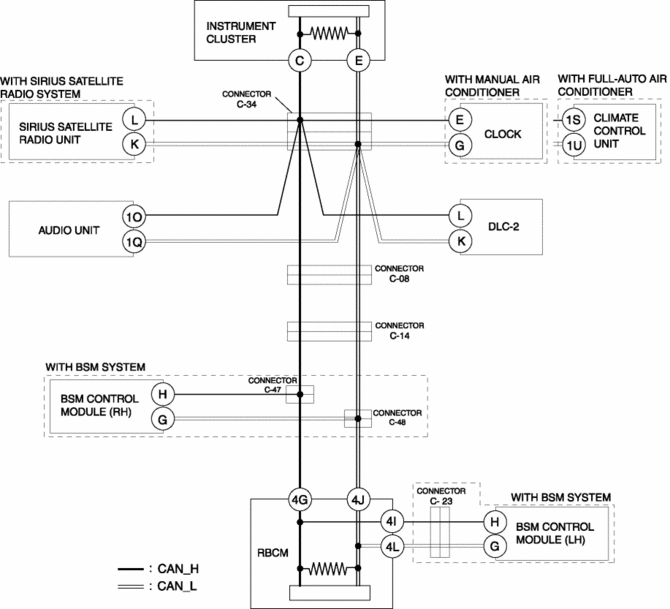
Terminator resistors are built into the rear body control module (RBCM) and instrument cluster which form the MS-CAN between the rear body control module (RBCM) and instrument cluster.
-
The instrument cluster is connected to the HS-CAN and MS-CAN which communicate with each other via the instrument cluster.
Body communication function
-
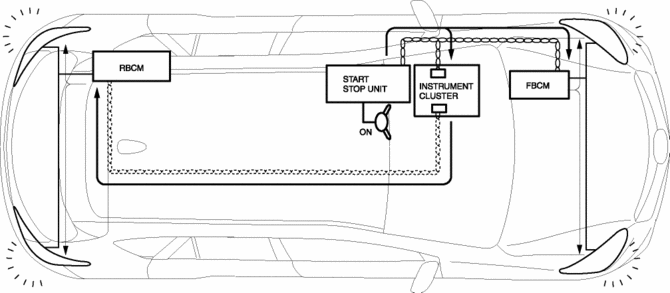
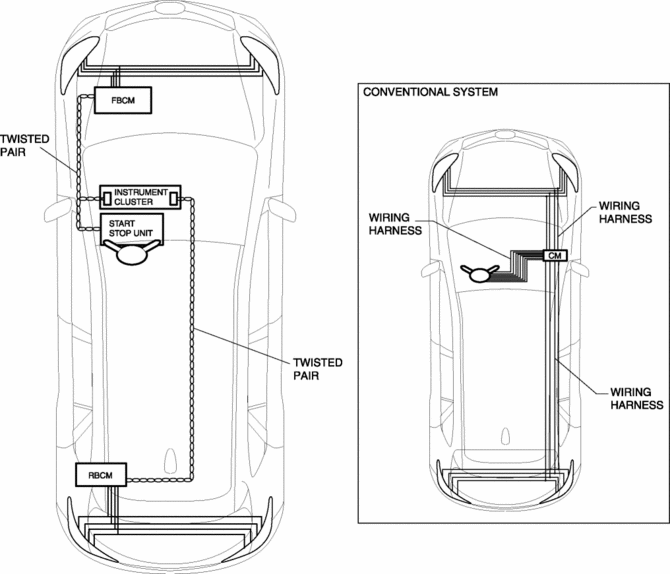
The front body control module (FBCM) is located at the vehicle front, the start stop unit is located in the dashboard, the rear body control module (RBCM) is located at the rear, and lighting parts, wiper parts, each type of switch, and door lock parts in each location are each connected to three control modules, creating a three-system communication network.
-
The front body control module (FBCM) and start stop unit are connected to the HS-CAN and the rear body control module (RBCM) is connected to the MS-CAN which communicate with each other via the instrument cluster.
-
For example, when the switch connected to the start stop unit is turned ON, the start stop unit sends an operation request signal to the front body control module (FBCM) and rear body control module (RBCM), which operate the parts on the front or rear.
-
By connecting the front body control module (FBCM), start stop unit, and rear body control module (RBCM) via the CAN, the number of wiring harness used compared to the conventional number used has decreased.
CAN signal table
-
Signals transmitted using the CAN system are as follows:
HS-CAN communication table
OUT: Output (sends signal)IN: Input (receives signal)|
Signal |
CAN system related module |
|||||||||
|
PCM |
TCM*1 |
AFS control module*2 |
AWD control module*3 |
DSC HU/CM |
EPS control module |
Front body control module (FBCM) |
Instrument cluster |
Start stop unit |
SAS control module |
|
|
Accelerator pedal opening angle |
OUT |
– |
– |
IN |
IN |
– |
– |
IN |
– |
IN |
|
AFS OFF switch status |
– |
– |
IN |
– |
– |
– |
– |
OUT |
– |
– |
|
AFS system configuration information |
– |
– |
OUT |
– |
– |
– |
– |
IN |
– |
– |
|
AFS system warning light status |
– |
– |
OUT |
– |
– |
– |
– |
IN |
– |
– |
|
Air bag system warning buzzer status |
– |
– |
– |
– |
– |
– |
– |
IN |
– |
OUT |
|
Air bag system warning light on request |
– |
– |
– |
– |
– |
– |
– |
IN |
– |
OUT |
|
Air bag system-related information |
– |
– |
– |
– |
– |
– |
– |
IN |
– |
OUT |
|
Ambient temperature |
IN |
IN |
IN |
IN |
IN |
IN |
IN |
OUT |
– |
IN |
|
OUT |
– |
– |
– |
IN |
– |
– |
– |
– |
– |
|
|
Answer-back-related information |
– |
– |
– |
– |
– |
– |
IN |
OUT |
– |
– |
|
AT shift position |
IN |
OUT |
– |
– |
– |
– |
– |
– |
– |
– |
|
AWD system status |
– |
– |
– |
OUT |
IN |
– |
– |
– |
– |
– |
|
– |
– |
– |
OUT |
– |
– |
– |
IN |
– |
– |
|
|
Back-up light on request |
– |
– |
IN |
– |
IN |
– |
– |
OUT |
– |
– |
|
Back-up light switch |
OUT |
– |
– |
– |
IN |
– |
– |
IN |
– |
– |
|
Battery management system malfunction determination |
OUT |
– |
– |
– |
– |
– |
– |
IN |
– |
– |
|
Battery regeneration status |
OUT |
– |
– |
– |
– |
– |
– |
IN |
– |
– |
|
Blower motor relay status |
– |
– |
– |
– |
– |
– |
OUT |
IN |
– |
– |
|
Brake fluid level |
– |
– |
– |
– |
– |
– |
OUT |
IN |
– |
– |
|
Brake light status |
– |
– |
– |
– |
IN |
– |
– |
OUT |
– |
– |
|
Brake override system cancel execution signal |
OUT |
– |
– |
– |
– |
– |
IN |
IN |
– |
– |
|
Brake switch (No.1 signal) |
OUT |
IN |
– |
– |
IN |
– |
IN |
IN |
– |
– |
|
Brake switch (No.2 signal) |
OUT |
IN |
– |
– |
– |
– |
– |
IN |
IN |
IN |
|
Brake switch malfunction determination |
OUT |
– |
– |
– |
– |
– |
– |
IN |
– |
– |
|
Check engine light on request |
OUT |
– |
– |
– |
– |
– |
– |
IN |
– |
– |
|
Cluster switch status |
– |
– |
IN |
– |
– |
– |
– |
OUT |
– |
– |
|
Clutch pedal stroke sensor (MTX only) |
OUT |
– |
– |
IN |
IN |
– |
– |
– |
– |
– |
|
Collision detection (front, side, roll over) |
IN |
– |
– |
– |
IN |
– |
IN |
– |
– |
OUT |
|
Collision detection (rear) |
IN |
– |
– |
– |
IN |
– |
IN |
– |
– |
OUT |
|
Cranking start |
IN |
– |
– |
– |
– |
– |
IN |
IN |
OUT |
– |
|
Cranking time |
OUT |
– |
– |
– |
– |
– |
– |
– |
IN |
– |
|
Cruise control set speed |
OUT |
– |
– |
– |
IN |
– |
– |
– |
– |
– |
|
Cruise control status |
OUT |
– |
– |
– |
IN |
– |
– |
– |
– |
– |
|
Cruise control switch |
OUT |
– |
– |
– |
IN |
– |
– |
– |
– |
– |
|
Cruise control switch signal |
IN |
– |
– |
– |
– |
– |
– |
– |
OUT |
– |
|
IN |
– |
– |
– |
IN |
– |
– |
– |
OUT |
– |
|
|
Cruise control system-related information |
IN |
– |
– |
– |
OUT |
– |
– |
– |
– |
– |
|
OUT |
– |
– |
– |
IN |
– |
– |
– |
– |
– |
|
|
Dimmer cancel |
– |
– |
– |
– |
– |
– |
– |
OUT |
IN |
– |
|
Driver-side buckle switch status |
– |
– |
– |
– |
– |
– |
– |
IN |
IN |
OUT |
|
DSC OFF switch status |
– |
– |
– |
– |
IN |
– |
– |
OUT |
– |
– |
|
DSC system-related information |
– |
– |
– |
– |
OUT |
– |
– |
IN |
– |
– |
|
– |
IN |
– |
– |
OUT |
– |
– |
IN |
– |
– |
|
|
– |
– |
– |
– |
OUT |
– |
IN |
– |
– |
– |
|
|
– |
– |
– |
– |
OUT |
– |
– |
– |
– |
– |
|
|
– |
– |
– |
– |
OUT |
– |
– |
IN |
– |
– |
|
|
Engine coolant temperature |
OUT |
– |
– |
– |
– |
– |
IN |
IN |
– |
– |
|
Engine displacement |
OUT |
– |
– |
IN |
IN |
– |
– |
IN |
– |
– |
|
OUT |
IN |
– |
IN |
IN |
IN |
IN |
IN |
– |
– |
|
|
Engine status |
OUT |
– |
– |
– |
– |
– |
– |
IN |
– |
– |
|
Engine status at idle |
OUT |
– |
– |
– |
– |
– |
– |
IN |
– |
– |
|
Engine torque |
OUT |
– |
– |
– |
– |
– |
IN |
– |
– |
– |
|
OUT |
– |
– |
IN |
– |
– |
– |
– |
– |
– |
|
|
OUT |
– |
– |
IN |
IN |
– |
– |
– |
– |
– |
|
|
Engine-off time |
IN |
– |
– |
– |
– |
– |
– |
– |
OUT |
– |
|
EPS status |
IN |
– |
– |
IN |
– |
|||||
 Controller Area Network (Can) Outline
The Electric Power Steering (EPS) control module sends and receives data
to and from other modules via the CAN..
Data sent
EPS status
Power steering malfunction indicator ...
 Front Body Control Module (Fbcm)
Outline
Located at the front of the vehicle, the front body control module (FBCM)
performs numerous system controls for functions at the front of the vehicle.
Function
The front ...
Other materials:
Rear Brake (Disc) Inspection
Brake Judder Repair Hints
Description
1. Brake judder concern has the following 3 characteristics:
Steering wheel vibration
1. The steering wheel vibrates in the rotation direction. This characteristic
is most noticeable when applying brakes at a vehicle speed of 100—140 km/h {62.2—86.9
...
Bsm Indicator Light Flashes While Not Under Bsm Indicator Light Flashing Conditions
(No Combination Switch Operation (Turn Signal Switch)) [Blind Spot Monitoring (Bsm)]
Description
BSM indicator light flashes while not under BSM indicator light-flashing
conditions (no combination switch operation (turn signal switch)
The BSM indicator light flashes despite not satisfying the BSM indicator
light flashing ...
Cooling System Service Warnings
WARNING:
Never remove the cooling system cap or loosen the radiator drain plug while
the engine is running, or when the engine and radiator are hot. Scalding engine
coolant and steam may shoot out and cause serious injury. It may also damage
the engine and cooling system.
Tu ...
