
Mazda CX-5 Service & Repair Manual: Cargo Compartment Light Removal/Installation
1. Disconnect the negative battery cable..
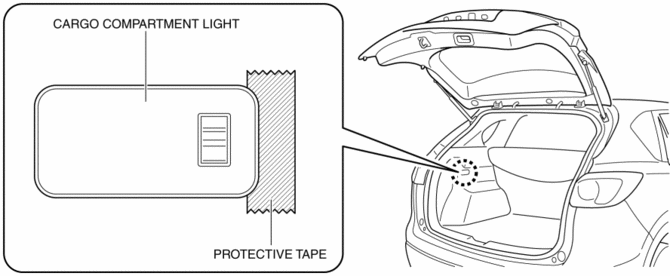
2. To prevent scratches or damage, affix protective tape to the position shown in the figure.
CAUTION:
-
If a flathead screwdriver is inserted into the gap between the cargo compartment light and trunk side trim, the trunk side trim could interfere with the flathead screwdriver and be damaged. When removing the cargo compartment light from the trunk side trim, perform the procedure after affixing protective tape to the trunk side trim.
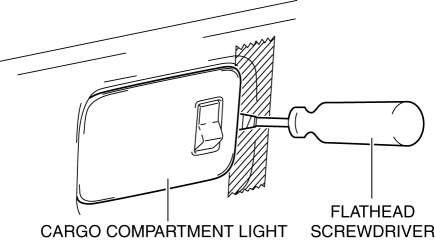
3. Insert a tape-wrapped flathead screwdriver into the gap between the cargo compartment light and trunk side trim shown in the figure.
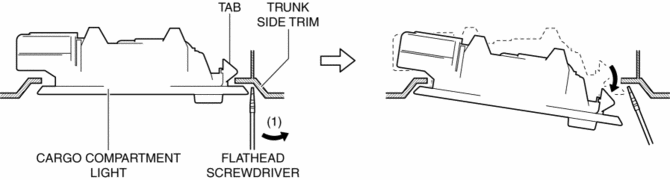
4. Move the flathead screwdriver in the direction of the arrow (1) shown in the figure, pull out the cargo compartment light from the trunk side trim, and detach the cargo compartment light tab and trunk side trim.
5. Remove the cargo compartment light.
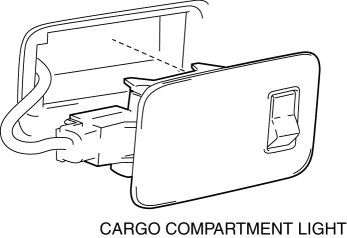
6. Disconnect the connector.
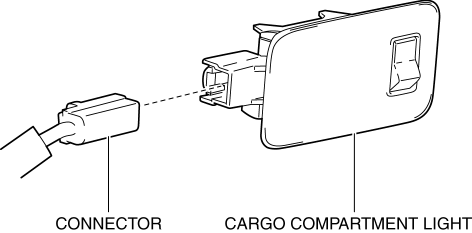
7. Install in the reverse order of removal.
 Cargo Compartment Light Inspection
1. Disconnect the negative battery cable..
2. Remove the cargo compartment light..
3. Verify that the continuity between the cargo compartment light terminals is
as indicated in the table.
...
 Lighting System Personalization
A personalization function has been adopted with which settings for each
function can be changed.
The following settings for the auto light system and interior light control
system ...
Other materials:
Solar Radiation Sensor [Full Auto Air Conditioner]
Purpose
The solar radiation sensor detects the sunlight intensity emitted to the
cabin.
Function
The solar radiation sensor converts the detected solar radiation amount to
an electric signal.
Construction
A photodiode (light receiving diode) has been adopted fo ...
Rain Sensor
Outline
The rain sensor detects the amount of rainfall and calculates the wiper operation
speed, and outputs a windshield wiper control signal to the front body control
module (FBCM) to perform automatic wiper operation (auto wiper system) according
to the amount of rainfall.
...
Rear Washer Hose Removal/Installation
1. Disconnect the negative battery cable..
2. Remove the front over fender..
3. Remove the mudguard (RH)..
4. Disconnect the rear washer hose A from the washer motor.
5. Remove the rear washer hose A from the washer tank hook.
6. Remove the rear washer hose A from clips A and B.
7. Disco ...
