
Mazda CX-5 Service & Repair Manual: Cargo Compartment Light
Purpose
-
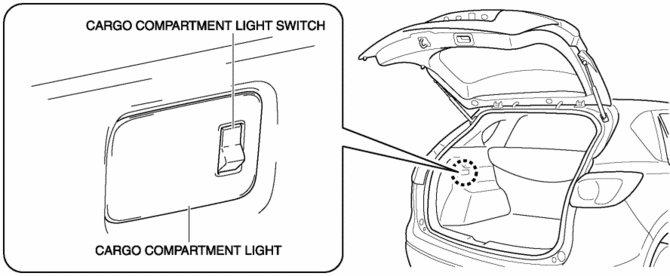
The cargo compartment light illuminates the cargo room interior when the liftgate is opened.
Function
-
When the liftgate is opened, illuminates by the cargo room light switch turning on.
Construction
-
The cargo room light is installed to the trunk side trim.
Operation
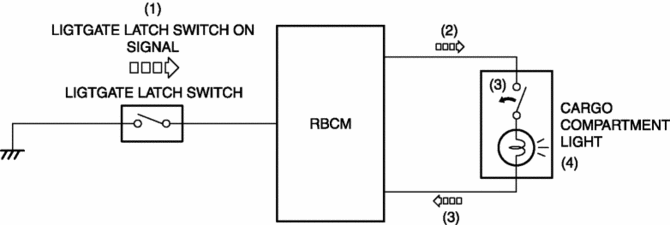
1. When the liftgate opens, the liftgate latch switch turns on and a liftgate light switch on signal is input to the rear body control module (RBCM).
2. When the rear body control module (RBCM) inputs the liftgate latch switch, electric current flows to the cargo room light.
3. When the cargo room light switch turns on, electric current flows to the cargo light bulb.
4. When electric current flows to the cargo room light bulb, the cargo room light bulb illuminates.
Fail-safe
-
Function not equipped.
 Auto Light System
Outline
The auto light system automatically turns the TNS and headlights on/off according
to the illumination level above and in front of the vehicle.
The auto light system is contro ...
 Cargo Compartment Light Bulb Removal/Installation
1. Disconnect the negative battery cable..
CAUTION:
Always disconnect the negative battery cable before performing the cargo
compartment light bulb removal. Otherwise, the circuit may be ...
Other materials:
Body Sealing [Water Proof And Rust Preventive]
Sealant is applied to the parts where the panels meet and to the hemmed parts
of the door panel and hood panel to provide water proofing and rust proofing.
...
Fuel Tank Removal/Installation
WARNING:
Fuel is very flammable liquid. If fuel spills or leaks from the pressurized
fuel system, it will cause serious injury or death and facility breakage. Fuel
can also irritate skin and eyes. To prevent this, always complete the “Fuel
Line Safety Procedure”, while referring ...
PID/Data Monitor Inspection [Adaptive Front Lighting System (Afs)]
1. Connect the M-MDS to the DLC-2.
2. After the vehicle is identified, select the following items from the initialization
screen of the M-MDS.
a. Select “DataLogger”.
b. Select “Modules”.
c. Select “AFS”.
3. Select the applicable PID from the PID table.
4. Verify the PID da ...
