
Mazda CX-5 Service & Repair Manual: C Pillar Trim Removal/Installation
1. Disconnect the negative battery cable..
2. Remove the following parts:
a. Trunk board.
b. Trunk end trim.
c. Rear scuff plate.
d. Trunk side trim.
e. D-pillar trim.
3. Partially peel back the seaming welt.
4. Remove the fastener A.
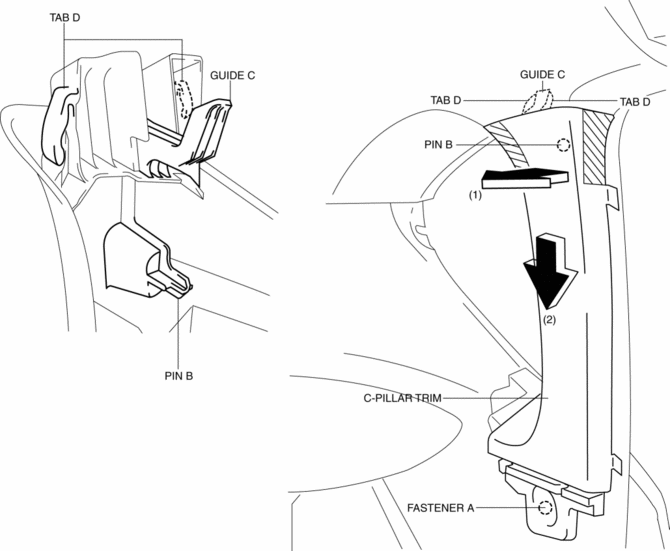
5. Take the shaded area shown in the figure, and pull the C-pillar trim in the direction of the arrow (1) while detaching the pin B.
6. Remove the C-pillar trim in the direction of the arrow (2) shown in the figure while detaching guide C, tabs D.
CAUTION:
-
If the C-pillar trim is pulled in the direction of the arrow (1) forcefully, guide C may be damaged. Carefully pull the C-pillar trim so as not to damage guide C.
7. Install in the reverse order of removal.
 B Pillar Upper Trim Removal/Installation
1. Remove the following parts:
a. Front scuff plate.
b. Rear scuff plate.
c. B-pillar lower trim.
d. Adjuster anchor cover.
e. Upper anchor installation bolts on the front seat belt.
2. Pa ...
 Center Panel Removal/Installation
1. Disconnect the negative battery cable..
2. Remove the decoration panel.
3. Take the shaded area shown in the figure, and pull the center panel in the
direction of the arrow in the order of (1 ...
Other materials:
Powertrain System Outline [Fw6 A EL, Fw6 Ax EL]
Outline
The powertrain consists of a 2-piece multi-plate clutch, 3-piece multi-plate
brake, a one-way clutch, and a 3-piece single-type planetary gear.
Construction
Component parts list
Component parts
Movement
Multi-plate clutch
...
Side Turn Light Removal/Installation
1. Disconnect the negative battery cable..
2. Remove the following parts:
a. Outer mirror glass.
b. Upper outer mirror garnish.
3. Remove the screws.
4. Disconnect the connector.
5. Remove the side turn light.
6. Install in the reverse order of removal. ...
Rear Drive Shaft Removal/Installation
CAUTION:
Performing the following procedures without first removing the ABS wheel?speed
sensor may possibly cause an open circuit in the harness if it is pulled by
mistake. Before performing the following procedures, remove the ABS wheel?speed
sensor (wheel side) and fix it to an ap ...
