
Mazda CX-5 Service & Repair Manual: Blind Spot Monitoring (Bsm) Off Indicator Light
Purpose
-
The BSM OFF indicator light informs the driver that the Blind Spot Monitoring (BSM) system is turned off or there is a malfunction in the system.
Function
-
The instrument cluster illuminates the BSM OFF indicator light based on the BSM system off signal sent via a CAN signal from the BSM control module (RH).
-
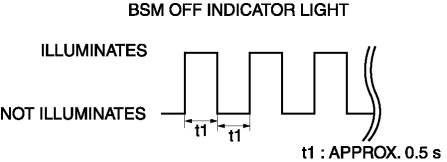
The instrument cluster flashes the BSM OFF indicator light based on the malfunction indication request signal sent via a CAN signal from the BSM control module (RH).
-
The flash pattern of the BSM OFF indicator light is as shown in the figure.
Construction
-
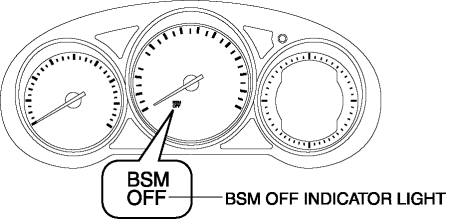
The BSM OFF indicator light are equipped in the instrument cluster.
Operation
-
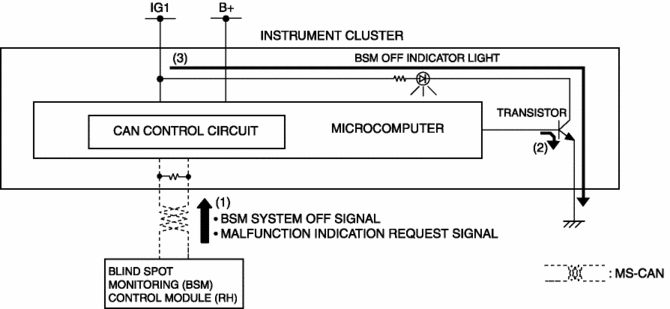
The instrument cluster receives (1) the BSM system off signal or malfunction indication request signal from the BSM control module (RH) via the CAN signal.
-
The instrument cluster turns the transistor on (2) intermittently for a malfunction indication request signal and continuously for a BSM system off signal.
-
When the transistor turns on intermittently, the BSM OFF indicator light flashes (3) and when it turns on continuously, the BSM OFF indicator light illuminates (3).
Fail-safe
-
Function not equipped.
 Blind Spot Monitoring (Bsm) Control Module Removal/Installation
1. Disconnect the negative battery cable..
2. Remove the rear combination light..
3. Remove the rear bumper..
4. Disconnect the connector.
5. Remove the nuts.
6. Remove the BSM control m ...
 Blind Spot Monitoring (Bsm) Off Switch
Purpose
The blind spot monitoring (BSM) system can be turned on or off optionally
by the driver.
Function
The switch operation signal is sent to the instrument cluster.
Co ...
Other materials:
Intake Air Temperature (Iat) Sensor Inspection
IAT Sensor No.1
Resistance inspection
NOTE:
Because the IAT sensor No.1 is integrated in the MAF sensor, replacing the
IAT sensor No.1 includes replacement of the MAF sensor/IAT sensor No.1.
1. Disconnect the negative battery cable..
2. Disconnect the MAF sensor/IAT sensor No.1 ...
Main Silencer
Purpose, Function
Reduces the exhaust noise.
Construction
The main silencer is installed to the vehicle rear, under the trunk compartment.
2WD
AWD
The main silencer consists of the filters, holder, set plates and stiffener.
...
Wiper Bracket Removal [Panel Replacement]
Symbol Mark
Installation Procedure
1. When installing new parts, measure and adjust the body as necessary to conform
with standard dimensions.
2. Drill holes for the plug welding before installing the new parts.
3. After temporarily installing new parts, make sure the related parts fit p ...
