
Mazda CX-5 Service & Repair Manual: Blind Spot Monitoring (Bsm) Control Module Removal/Installation
1. Disconnect the negative battery cable..
2. Remove the rear combination light..
3. Remove the rear bumper..
4. Disconnect the connector.
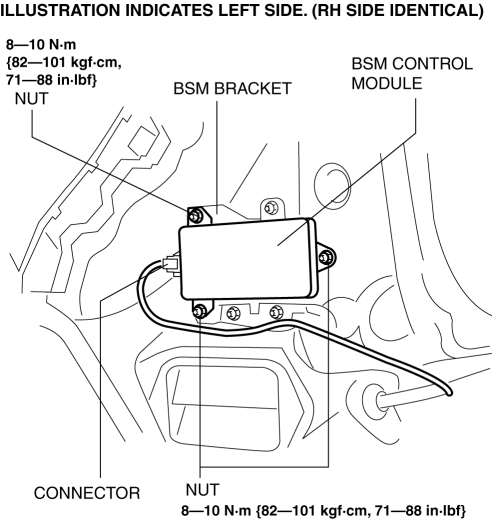
5. Remove the nuts.
6. Remove the BSM control module.
7. Install in the reverse order of removal.
8. Perform the BSM radar test..
CAUTION:
-
If the BSM control module is replaced, not performing the BSM radar test will cause a deviation in the radar emission angle which could result in the system not detecting a vehicle approaching from the rear correctly. If the BSM control module is replaced, perform the BSM radar test.
 Blind Spot Monitoring (Bsm) Control Module Inspection
1. Disconnect the negative battery cable..
2. Remove the rear combination light..
3. Remove the rear bumper..
4. Connect the negative battery cable..
5. Verify that the voltages of each of the ...
 Blind Spot Monitoring (Bsm) Off Indicator Light
Purpose
The BSM OFF indicator light informs the driver that the Blind Spot Monitoring
(BSM) system is turned off or there is a malfunction in the system.
Function
The instrument ...
Other materials:
Oil Seal (Differential) Replacement [C66 M R]
1. Remove the front under cover No.2..
2. Drain the manual transaxle oil..
3. Disconnect the drive shaft (LH) from the MTX..
4. Disconnect the drive shaft (RH) from the MTX..
5. Remove the oil seal (LH).
6. Remove the oil seal (RH).
7. Using the SSTs and a hammer, tap a new oil s ...
Steering Shaft Inspection
1. Inspect the steering column for excessive play and damage.
2. Verify that the clearance between the projection on the steering column shown
in the figure and the bracket is less than 2.0 mm {0.079 in}.
If the clearance between the projection and bracket is 2.0 mm {0.079 in}
or ...
Magnet Clutch [Full Auto Air Conditioner]
Purpose
The magnetic clutch transmits the rotation force from the engine to the shaft
in the A/C compressor.
Function
The magnetic clutch engages or disengages the magnetic clutch and the A/C
turns on or off by switching the power transmission from the engine.
C ...
