
Mazda CX-5 Service & Repair Manual: Auto Leveling Sensor Inspection
1. Disconnect the negative battery cable..
2. Remove the auto leveling sensor..
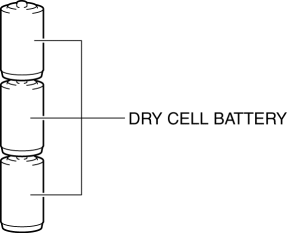
3. Prepare three dry cell batteries (1.5 V
).
4. Connect the three dry cell batteries in a series.
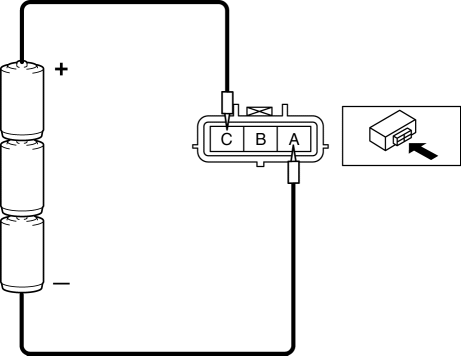
5. Connect the positive pole of the dry cell battery to auto leveling sensor terminal C, and the negative pole to terminal A.
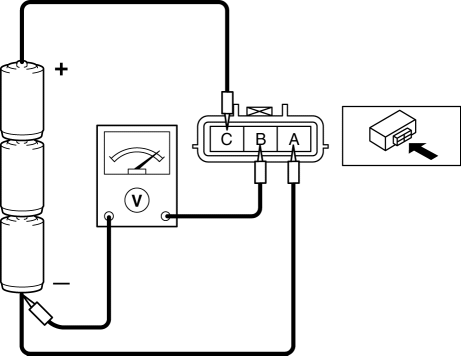
6. Connect the tester as shown in the figure with approx. 4.5 V
of voltage applied between auto leveling sensor terminals A and C, and measure the voltage at auto leveling sensor terminal B.
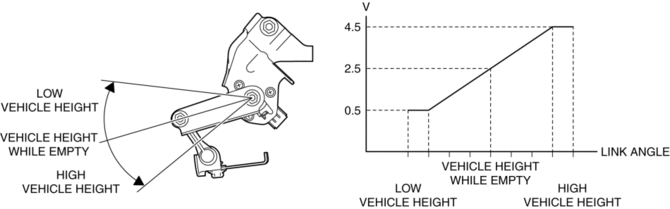
7. When slowly moving the auto leveling sensor link up and down, verify that the voltage fluctuates linearly between 0.5—4.5 V
as shown in the figure.
-
If the voltage cannot be verified as indicated in the graph, replace the auto leveling sensor.
 Auto Leveling Sensor
Purpose
Detects the vehicle height and outputs it to the AFS control module.
Function
Changes the detected vehicle height into a voltage value and outputs it to
the AFS control ...
 Auto Leveling Sensor Removal/Installation
1. Disconnect the negative battery cable..
2. Disconnect the connector.
3. Remove the bolts.
4. Remove the auto leveling sensor.
5. Install in the reverse order of removal.
6. Pe ...
Other materials:
Instrument Cluster
Outline
The instrument cluster centrally controls the speedometer, tachometer, odometer/tachometer,
fuel gauge, warning/indicator lights, trip computer, warning sounds and panel
lights.
Function
The instrument cluster displays the following information to notify the user
...
Blower Motor [Manual Air Conditioner]
Purpose
The blower motor sends airflow into the cabin.
Function
The blower motor rotates the blower fan to create airflow and sends out the
airflow in the blower unit and A/C unit.
Construction
The blower motor is installed to the blower unit.
The bl ...
Cooling System Cap Inspection
WARNING:
Never remove the cooling system cap or loosen the radiator drain plug while
the engine is running, or when the engine and radiator are hot. Scalding engine
coolant and steam may shoot out and cause serious injury. It may also damage
the engine and cooling system.
Tu ...
