
Mazda CX-5 Service & Repair Manual: Audio Unit (Without Color LCD)
NOTE:
-
“iPod” is a registered trademark of Apple Inc. in the United States and other countries.
Outline
-
The audio unit controls the CD, radio, exterior input devices (AUX/USB/iPod) and the display.
Function
-
The display integrated into the audio unit displays audio information such as CD and radio related information.
-
Records the following items which the user has set.
|
Item |
Specification |
|
|
Preset memory |
AM |
6 |
|
FM1 |
6 |
|
|
FM2 |
6 |
|
|
SIRIUS (SAT1) |
6 |
|
|
SIRIUS (SAT2) |
6 |
|
|
SIRIUS (SAT3) |
6 |
|
USB/iPod applicable
-
A USB device such as USB memory or an iPod connected to the auxiliary jack/USB port can be controlled by the audio unit.
Latin character display
-
Information such as CD and radio related information can be displayed in the audio unit display in Latin characters.
Specification
|
Item |
Specification |
||
|
Rated voltage |
(V) |
12 |
|
|
Frequency range |
AM |
(kHz) |
530—1,710 |
|
FM |
(MHz) |
87.75—107.9 |
|
|
Amplifier maximum output |
(W) |
25?4 |
|
|
Output impedance |
(ohm) |
4 |
|
Construction
-
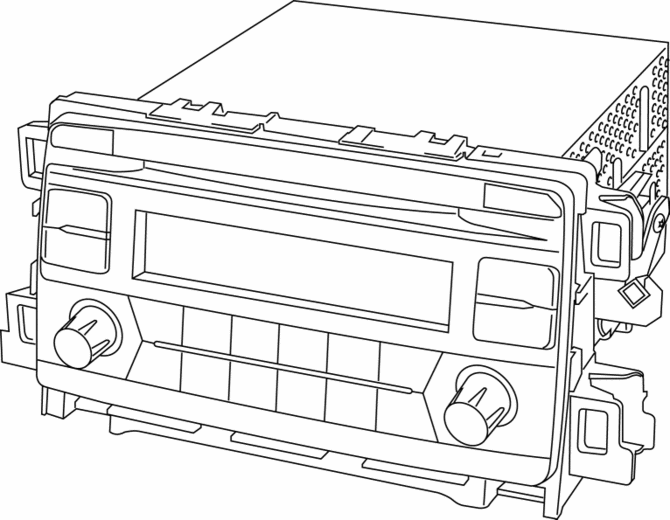
An audio unit with integrated AM/FM tuner/MP3/WMA (Windows Media Audio)/AAC (Advanced Audio Coding) applicable CD player is assembled to the audio panel.
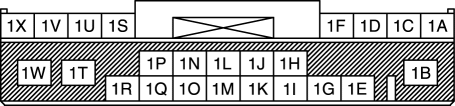
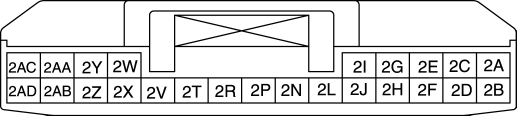
Terminal layout and signal
Audio unit
|
Terminal |
Signal |
|
|
|
1A |
Front door speaker LH (+) |
|
1B |
B+ |
|
|
1C |
Front door speaker LH (-) |
|
|
1D |
Front door speaker RH (+) |
|
|
1E |
TNS (+) |
|
|
1F |
Front door speaker RH (-) |
|
|
1G |
TNS (–) |
|
|
1H |
— |
|
|
1I |
Vehicle speed signal |
|
|
1J |
— |
|
|
1K |
— |
|
|
1L |
— |
|
|
1M |
— |
|
|
1N |
Steering switch 1 |
|
|
1O |
— |
|
|
1P |
Steering switch 2 |
|
|
1Q |
— |
|
|
1R |
ACC |
|
|
1S |
Rear door speaker LH (+) |
|
|
1T |
— |
|
|
1U |
Rear door speaker LH (-) |
|
|
1V |
Rear door speaker RH (+) |
|
|
1W |
Power ground |
|
|
1X |
Rear door speaker RH (-) |
|
|
|
2A |
— |
|
2B |
— |
|
|
2C |
— |
|
|
2D |
— |
|
|
2E |
— |
|
|
2F |
— |
|
|
2G |
— |
|
|
2H |
— |
|
|
2I |
— |
|
|
2J |
— |
|
|
2L |
— |
|
|
2N |
— |
|
|
2P |
— |
|
|
2R |
— |
|
|
2T |
— |
|
|
2V |
— |
|
|
2W |
AUX control |
|
|
2X |
AUX LH, RH (-) |
|
|
2Y |
AUX signal RH (+) |
|
|
2Z |
AUX signal LH (+) |
|
|
2AA |
— |
|
|
2AB |
— |
|
|
2AC |
— |
|
|
2AD |
— |
|
|
|
3A |
USB power ground |
|
3B |
USB data (+) |
|
|
3C |
USB power supply |
|
|
3D |
USB data (-) |
|

Antenna feeder connector
|
Terminal |
Signal |
|
|
|
4A |
ANT CONT |
|
4B |
Antenna |
|

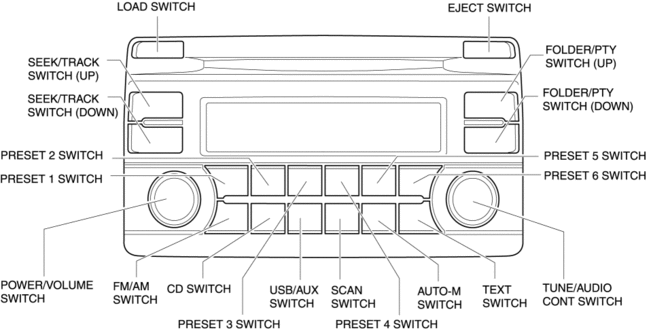
Switch Location
Operation
-
Refer to AUDIO SYSTEM.
Fail-safe
-
Function not equipped.
 Audio Unit (With Color LCD)
NOTE:
“iPod” is a registered trademark of Apple Inc. in the United States and other
countries.
Purpose
The audio unit controls the CD, radio, exterior input devices (AUX/US ...
 Audio Unit Personalization Features Setting Procedure
Door Locks Systems
1. Switch the ignition ON (engine off or on).
2. Turn the audio unit power on.
3. Select the following from the audio unit screen.
a. “Setup”
b. “Vehicle”
c. “D ...
Other materials:
Front Parking Brake Cable Removal/Installation
1. Remove the front console box..
2. Remove the shift lever knob. (MTX).
3. Remove the shift panel..
4. Remove the upper panel..
5. Remove the rear console..
6. Remove in the order indicated in the table.
7. Install in the reverse order of removal.
8. After installation, inspect the pa ...
Roof Molding Removal
1. Insert a tape-wrapped flathead screwdriver in the position shown in the figure.
2. Rotate a tape-wrapped flathead screwdriver in the direction of the arrow in
the order of (1), (2) shown in the figure and remove the roof molding from the front
T-stud.
3. Rotate the roof molding in th ...
Neutral Switch Removal/Installation [C66 M R]
1. Disconnect the negative battery cable..
2. Remove the air cleaner component. (ex: air cleaner, air hose).
3. Remove in the order indicated in the table.
4. Install in the reverse order of removal.
1
Neutral switch connector
2
Neutral ...
