
Mazda CX-5 Service & Repair Manual: Audio Amplifier Removal/Installation
1. Disconnect the negative battery cable..
2. Remove the following parts:
a. Front scuff plate (RH).
b. Front side trim (RH).
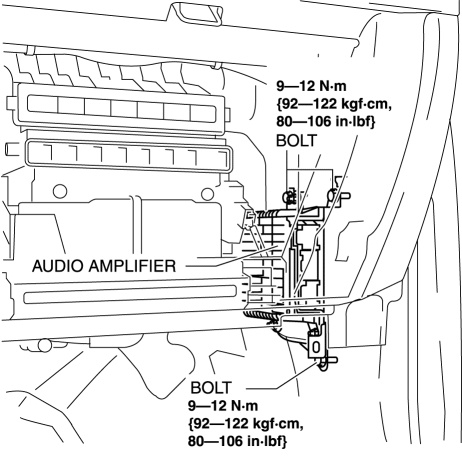
3. Remove the bolts.
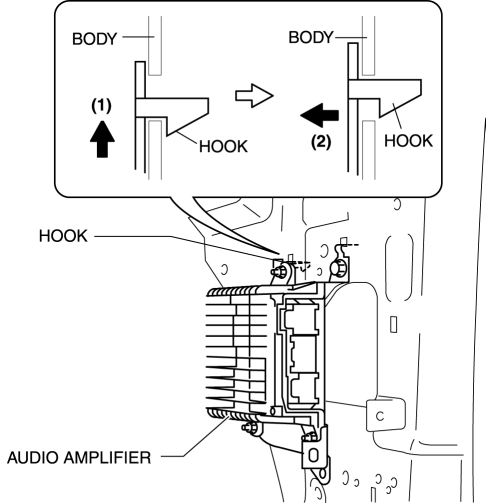
4. Lift up the audio amplifier in the direction of the arrow (1) shown in the figure, pull it in the direction of the arrow (2) shown in the figure, and pull out the audio amplifier hook from the body.
5. Disconnect the connectors.
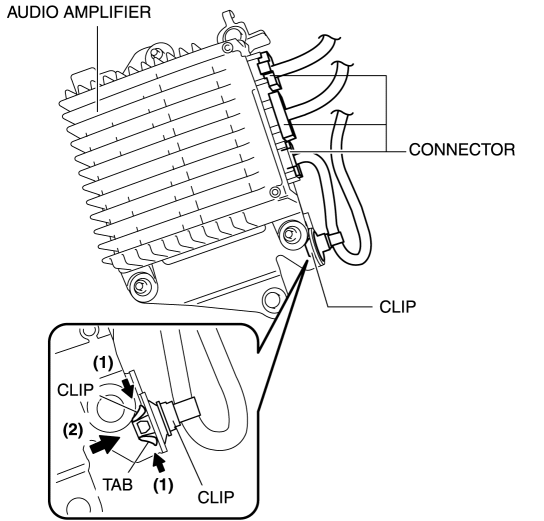
6. While pressing the clip tabs in the direction of the arrows (1) shown in the figure, press the clip in the direction of the arrow (2) to detach the clip tabs from the audio amplifier.
7. Detach the clip.
8. Remove the audio amplifier.
9. Install in the reverse order of removal.
 Audio Amplifier
Purpose, Function
The audio signal (analog voltage waveform) output from the unit equipped
on the vehicle is converted into a digital pulse. The converted digital pulse
signal is amplifie ...
 Audio Pilot®2 Microphone Removal/Installation
NOTE:
AudioPilot®2 is a registered trademark of Bose® Corporation.
1. Disconnect the negative battery cable..
2. Remove the following parts:
a. Driver-side front scuff plate.
b. ...
Other materials:
Interior Lights
Overhead Lights
Front Map Lights
When the overhead light switch is in the door or off position, press the lens
to illuminate the front map lights, and then press the lens again to turn them off.
NOTE
The front map lights will not turn off even if the lens is pressed in the
following ca ...
C Pillar Trim Removal/Installation
1. Disconnect the negative battery cable..
2. Remove the following parts:
a. Trunk board.
b. Trunk end trim.
c. Rear scuff plate.
d. Trunk side trim.
e. D-pillar trim.
3. Partially peel back the seaming welt.
4. Remove the fastener A.
5. Take the shaded area shown in the figure ...
Cruise Set Indicator Light (Green)
Purpose/Function
Illuminates during the cruise control system operation to inform the driver
that the cruise control system is operating.
Construction
Built into the instrument cluster.
Operation
Illuminates during the cruise control system operation.
...
