
Mazda CX-5 Service & Repair Manual: Air Mix Actuator Removal/Installation [Full Auto Air Conditioner]
Driver-side
1. Disconnect the negative battery cable..
2. Remove the following parts:
a. Side wall (driver-side).
b. Front heat duct (LH).
3. Disconnect the air mix actuator connector.
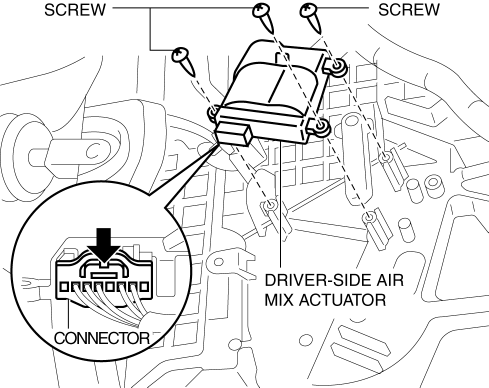
4. Remove the screw.
5. Remove the driver-side air mix actuator.
6. Install in the reverse order of removal.
Passenger-side
1. Disconnect the negative battery cable..
2. Remove the following parts:
a. Dashboard under cover.
b. Glove compartment.
3. Disconnect the air mix actuator connector.
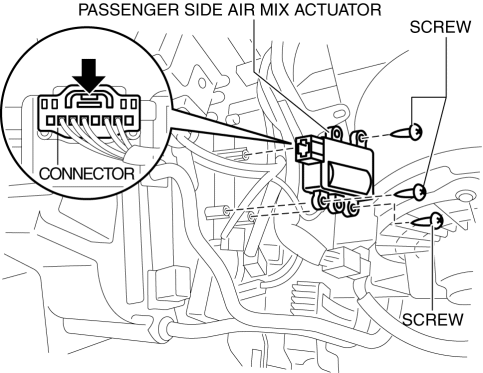
4. Remove the screw.
5. Remove the passenger-side air mix actuator.
6. Install in the reverse order of removal.
 Air Mix Actuator Inspection [Full Auto Air Conditioner]
CAUTION:
If the lever position exceeds the operation range shown in the figure, the
circuit in the actuator could be damaged. Always perform an actuator operation
inspection with the lev ...
 Air Mix Actuator [Full Auto Air Conditioner]
Purpose
The air mix actuator moves the air mix door in the A/C unit to adjust the
temperature of the air blown from the air vent.
Function
Door open/close function
The air mix ...
Other materials:
Catalytic Converter
Purpose, Function
Purifies contaminants in the exhaust gas by utilizing the chemical reactions
of the three-way catalytic converter.
A WU-TWC and a TWC have been adopted.
WU-TWC
The three-way catalyst is integrated with the exhaust manifold.
Because the c ...
Intake Air System
Purpose, Outline
A vacuum pump has been adopted which supplies stable vacuum to the power
brake unit.
Structural View
System Diagram
Vacuum Hose Routing Diagram
Structure
The intake air system consists of the following parts:
Part na ...
Lighting Control
Headlights
• Turn the headlight switch to turn the headlights,
other exterior lights and dashboard illumination on or off.
• A system malfunction or operation conditions
are indicated by a warning.
Refer to Warning/Indicator Lights 5.
NOTE
• If the light switch is left on, the
light ...
