
Mazda CX-5 Service & Repair Manual: Air Bag System Warning Alarm [Two Step Deployment Control System]
Purpose
-
The air bag system warning alarm notifies the driver that a malfunction occurred in the air bag system instead of the air bag system warning light.
Function
-
If a malfunction occurs in the air bag system while the air bag system warning light cannot illuminate, the air bag system warning alarm sounds.
Construction
-
The air bag system warning alarm sounds a buzzer in the instrument cluster.
Operation
-
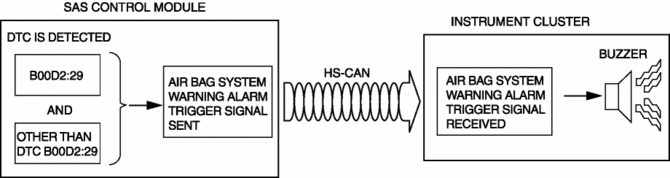
The SAS control module sends the air bag system warning alarm trigger signal to the instrument cluster via CAN communication to sound the buzzer in the instrument cluster.
-
If all of the following conditions are met, the SAS control module sends the air bag system warning alarm trigger signal to the instrument cluster.
-
SAS control module detects DTC B00D2:29 (air bag system warning light (during communication related malfunction))
-
SAS control module detects DTCs other than DTC B00D2:29 (Except for air bag system warning light does not illuminate DTC)
-
Refer to the air bag system warning alarm for the air bag system warning alarm sound interval.
Fail-safe
-
Function not equipped.
 Air Bag System Warning Alarm [Standard Deployment Control System]
Purpose
The air bag system warning alarm notifies the driver that a malfunction occurred
in the air bag system instead of the air bag system warning light.
Function
If a malfunc ...
 Air Bag System Warning Light [Standard Deployment Control System]
Purpose
The air bag system warning light notifies the driver of a malfunction in
the SRS air bag system.
Function
If a malfunction occurs in the SRS air bag system, the air bag ...
Other materials:
Rear Drive Shaft Inspection
1. Inspect each connecting part for looseness.
Tighten or replace parts if necessary.
2. Inspect the dust boot on the drive shaft for cracks, damage, leaking grease,
and looseness in the boot band.
3. Inspect the drive shaft for bends, cracks, and wear in the joints or splines. ...
Dynamic Stability Control (DSC)
Outline
Electrical brake assist control has been adopted, improving safety.
The DSC HU/CM, integrating both the hydraulic unit (HU) and control module
(CM), has been adopted, resulting in a size and weight reduction.
An enhanced malfunction diagnosis system, used with the M ...
SRS Air Bag Deployment Criteria
This chart indicates the applicable SRS equipment that will deploy depending
on the type of collision.
(The illustrations are the representative cases of collisions.)
X: The SRS air bag equipment is designed to deploy in a collision.
*1 (With Driver and Front Passenger Occupant Classification ...
