
Mazda CX-5 Service & Repair Manual: Accelerator Pedal, Kickdown Switch [Skyactiv G 2.0]
Purpose, Function
-
The driver's intentions are transmitted to the PCM via the accelerator pedal.
-
Kickdown switch (ATX) (Applied VIN (assumed): JM3 KE2*E*D# 148107?)
-
If the accelerator pedal is depressed carelessly, kickdown control will be implemented based on the accelerator pedal being determined as fully open, and vehicle shock will occur. A kickdown switch has been adopted so that it can be determined that the accelerator pedal is fully open based on the driver’s intention of depressing the accelerator pedal for kickdown.
Construction
-
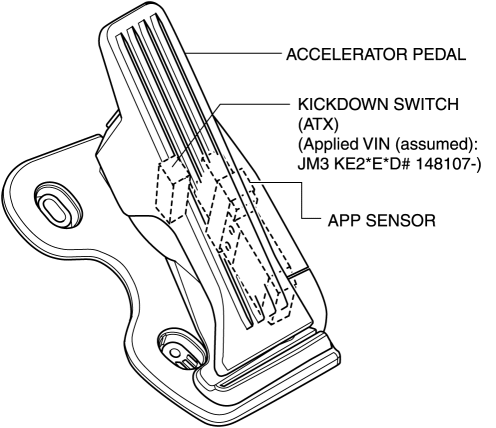
The accelerator pedal has a built-in APP sensor and kickdown switch (ATX).
-
For the APP sensor, refer to CONTROL SYSTEM..
Kickdown Switch (ATX) (Applied VIN (assumed): JM3 KE2*E*D# 148107?)
-
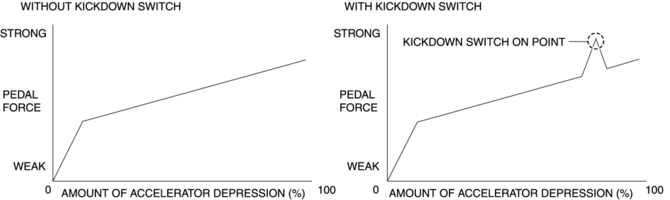
A load can be felt while the accelerator pedal is being depressed and when it is further depressed the kickdown switch turns on.
-
The driver can control the kickdown by knowing the amount of accelerator depression.
-
The kickdown switch is only a measure of the kickdown. An electrical signal is not transmitted by the kickdown switch turning on/off, and vehicle control is not affected.
 ABS Wheel Speed Sensor And ABS Sensor Rotor
Purpose/Function
The ABS wheel-speed sensor and ABS sensor rotor detect the rotation condition
of each wheel and transmit this information to the DSC HU/CM.
The signal from the ABS w ...
 Differential Oil Temperature Sensor
Purpose, Function
The differential oil temperature sensor detects the rear differential oil
temperature based on the resistance of the thermistor, and inputs it to the
AWD CM.
Const ...
Other materials:
Automatic Transaxle Warning Light [Fw6 A EL, Fw6 Ax EL]
Purpose/Function
The automatic transaxle warning light illuminates when the transaxle has
malfunction.
Construction
The automatic transaxle warning light is built into the instrument cluster.
Operation
If the transmission has a malfunction, the TCM sends an ...
Fuel Filler Cap Inspection
Leakage Inspection
1. Perform the following tester (evaporative emission system tester (134-01049A))
self-test:
NOTE:
If the tester does not work correctly during self-test, refer to the tester
operators manual for more detailed procedures.
a. Verify that the gas cylinder valve ...
Heated Oxygen Sensor (HO2 S) Heater Control
Outline
Based on the control of the HO2S heater, a stabilized oxygen concentration
is detected even at low exhaust temperatures, and feedback control of fuel injection
even at cold engine start is made possible for improved cold temperature exhaust
emission performance.
Both ...
